Items Page
Overview
The Items page within the Inventory section provides a comprehensive table listing all items stored in your 1Password system. This table includes essential information about each item, enabling you to monitor and manage item security and access effectively.
Table Columns
The Items table contains the following columns, each providing specific details about the items:
- Avatar: A small image representing the item.
- Vault: The vault where the item is stored.
- Title: The title or name of the item.
- Impact If Compromised: The potential impact level if the item is compromised (e.g., High, Medium, Low).
- Strength: The strength of the item's password or security configuration.
- Reused Passwords: Indicates if the item uses reused passwords.
- Duplicate Items: Indicates if there are duplicate items.
- Item Shares: Information on how many times the item has been shared.
- Rotated At: The last time the item's password was rotated.
- Created At: The date the item was created.
- Activities: A summary of recent activities related to the item.
- Findings: Any security findings related to the item.
Row Clickability
Each row in the table is clickable. Clicking on a row will navigate you to the detailed page for that item, where you can view more in-depth information and perform specific actions.
Setting Impact if Compromised
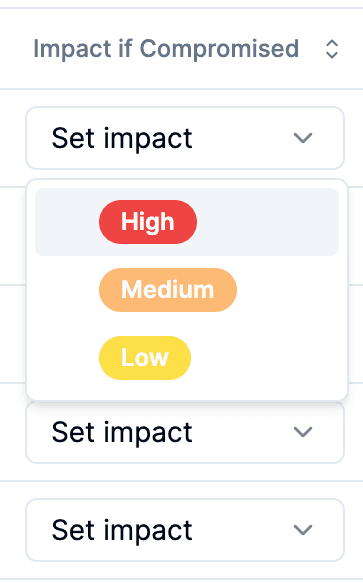
For each item, you can set the potential impact level if the item is compromised. This information is crucial for assessing and managing the risk associated with each item.
- Click on the Impact If Compromised cell for the item you want to set.
- Select the appropriate impact level (High, Medium, Low) from the dropdown menu.
Assigning Item Owner
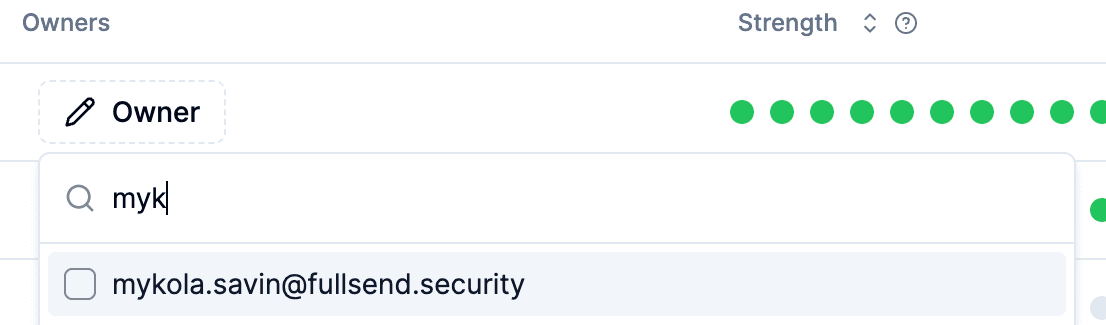
You can also assign an owner to each item. This feature helps in centralizing responsibility and management for the items.
- Click on the Owner cell for the item you want to assign.
- Select the user you want to assign as the owner from the dropdown menu.
- Click Set owner to apply the changes.
By setting the impact level and assigning an owner, you can leverage these attributes in various features of the Gorilla software, enhancing your ability to manage and secure your items effectively.